

Planner

Fewer trucks driving back empty

See every truck's week with its current and next trip, and run a load search for each one. Dispatchers fill the gaps before Monday instead of rebuilding a spreadsheet

Live in days, not months.
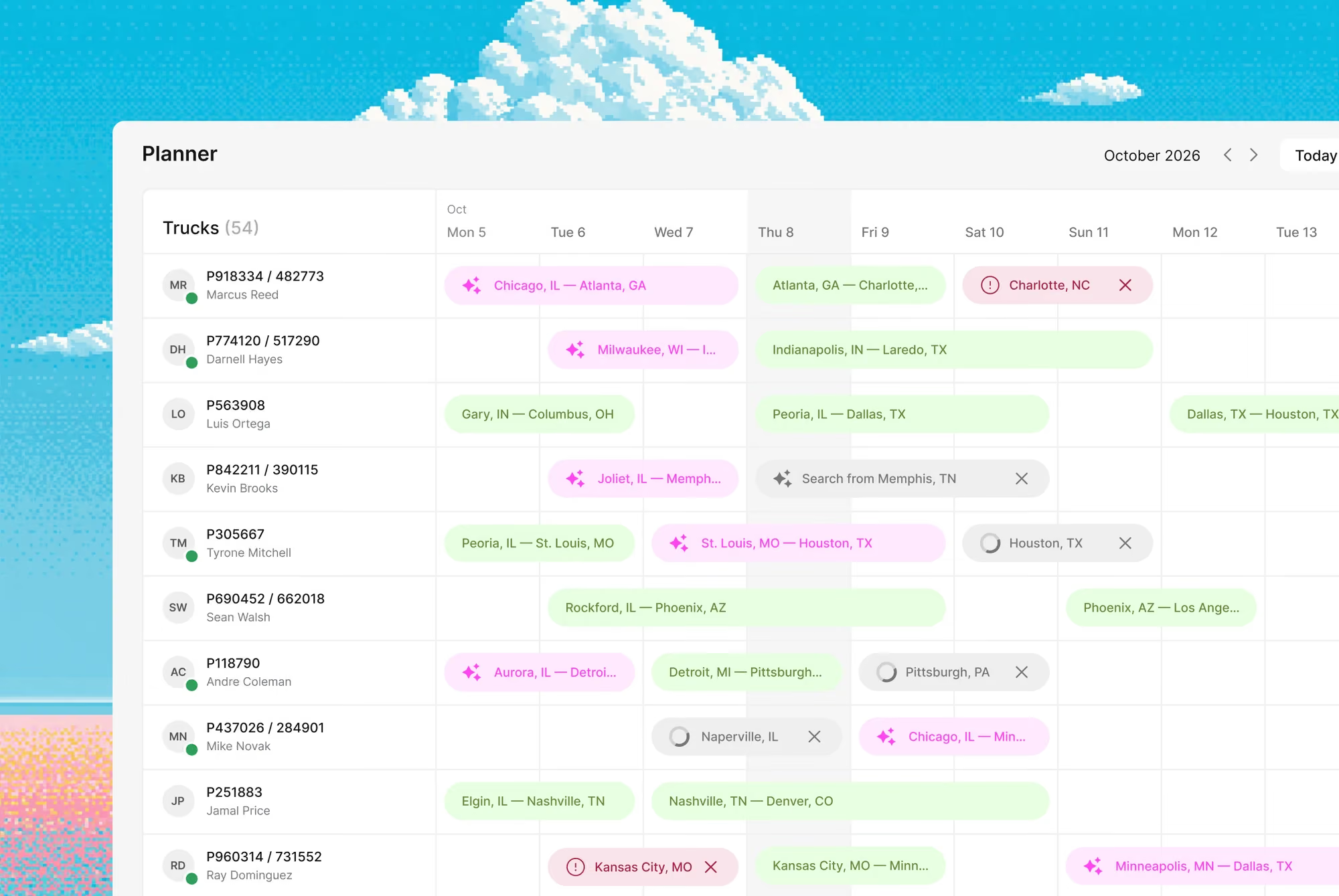
Planner interface

Planner shows each truck with its current and next trip, next to the load searches running for it. Truck status updates from driver messages, calls and workflows, so the plan stays current without calling every driver

Features

A full week planned for every truck

The fleet is planned in a spreadsheet and updated by calling drivers, so gaps in the week turn into empty runs. With Planner, every truck's current and next trip sit in one plan, with a load search running for each

The whole fleet in one plan

Open the plan and see every truck with its current and next trip

A load search for each truck

Set a search by direction, dates and truck type for a specific truck. For a truck unloading in Kraków tomorrow, Planner shows backhaul matches before it gets there

Status without calling the driver

When a driver reports in a messenger that the truck is unloaded, its status updates without a call to dispatch

Connected to Fleet and Load Hub

Trucks come from Fleet, and every load search runs through Load Hub

Pixel art scene of a logistics warehouse with red and yellow forklifts lined up by loading docks of a red brick building under large fluffy clouds, with a worker in red uniform holding a tablet on the right.
Why Cargofy

A full week planned for every truck

The fleet is planned in a spreadsheet and updated by calling drivers, so gaps in the week turn into empty runs. With Planner, every truck's current and next trip sit in one plan, with a load search running for each

The whole fleet in one plan

Open the plan and see every truck with its current and next trip

A load search for each truck

Set a search by direction, dates and truck type for a specific truck. For a truck unloading in Kraków tomorrow, Planner shows backhaul matches before it gets there

Status without calling the driver

When a driver reports in a messenger that the truck is unloaded, its status updates without a call to dispatch

Connected to Fleet and Load Hub

Trucks come from Fleet, and every load search runs through Load Hub

Impact

With digital workers, everything changes

15%

fewer empty miles on average

100%

of truck statuses in a single view

48 hours

ahead for every truck

Superpowers

What the Planner Manager does

Publish Truck to Load Boards

The worker posts available trucks to connected load boards

Call Driver for Status

The worker calls the driver and updates the truck's status in the plan

Message Driver for Status

The worker asks the driver for status in a messenger and writes the answer into the plan
Integrations

Plays well with your stack

Highlight

Please don't put cases here. Cases in Solutions

Architect is the AI that sets up Cargofy for you. Send it a text or voice message, and it builds the fields, forms and workflows you need, or passes the task to an AI worker

Related primitives

Each agent operates within different contexts and sets of instructions, creating unique workflows and data models

Workflows involved

Find loads at DAT
The moment a truck goes empty, this playbook sweeps DAT, scores every load against your floor, negotiates and books.
Daily check calls
Calls every driver on the morning list — position, status, problems — in their language, and puts one sheet on your desk.
Data models
Fleet
Your trucks and capacity as one file: how many, what kind, where they live and how hard they work. The drawer a fleet owner checks before saying yes to new business.
Load
A bookable unit of freight: the shipments, the truck, the rate and the dates, stapled together. This is the file a dispatcher trades on all day.
Booking
The confirmed slot on a vessel, flight or train — cut-offs, ports and container counts in one file. When the line says "confirmed", this drawer is where it's written down.
Rate
Pricing per lane and mode, filed with dates and small print attached. When a worker quotes, books or audits, the number comes out of this drawer.
Driver
The person behind the wheel: license, hours, certifications and contact details, filed properly. When a dock asks "who's coming?", this is the answer.
Truck Availability
Information about when and where a truck is available for its next trip. It is used when planning and searching for a suitable load.
Fleet Unit
A fleet unit with its own details and documents. It can be linked to trips to keep transport information in one record.
Trip
A trip performed by your fleet with assigned transport, a driver and stops. The record is linked to the load carried on that trip.
Interfaces
Trucks Map
A map of truck locations. It helps the dispatcher account for vehicle location when planning the next trips.
Truck Status Calendar
A truck calendar with current and next trips. It helps the dispatcher review fleet utilization and plan upcoming transport jobs.
FAQ

Common Questions

Everything you need to know about deploying AI Digital Workers into freight operations — from how they work to how fast you can go live.‍

What is truck planning software?

Truck planning software shows the status and availability of every truck in a fleet so dispatchers can plan the next load. Cargofy Planner shows each truck's current and next trip and runs load searches for specific trucks through Load Hub

How is Planner different from Load Hub?

Load Hub answers which load to take. Planner answers what each of your trucks is doing today and tomorrow. Planner takes trucks from Fleet and sends load searches to Load Hub

Does Planner track hours of service?

No. Planner isn't a compliance tool for driver working and rest time, such as HOS or tachograph rules. Carriers account for those rules themselves

Agent iconAgent iconAgent iconAgent icon

Ready to put a Digital Worker on the job?

Live in days, not months — connected to your TMS, load boards, and the 50,000-company Cargofy Network from day one.