

Nov 1–14: AI assistants, website tasks for Digital Workers, Routines
What's New in Cargofy is our regular digest of product updates: what changed inside the platform over the past two weeks.
This issue covers November 1–14, 2026: Cargofy now works from Claude, ChatGPT and other AI assistants, Digital Workers can do tasks on websites, Routines puts every scheduled workflow in one list, and you can follow a carrier call live inside the tender.
AI assistants
Work in Cargofy from Claude, ChatGPT and other assistants
Cargofy now connects to Claude, ChatGPT, Gemini, Perplexity and Manus, and to the agent platforms Paperclip, OpenClaw and Hermes. Once connected, the assistant acts in Cargofy on behalf of one person: it sees and does what that person can do by hand, in their company, with their rights. Every action shows up in the history as that person's, marked with the assistant that made it.
Setup takes a minute. Copy the address from Cargofy, paste it into the assistant, click Connect and approve access on the Cargofy screen. One connection follows you when you switch between companies in Cargofy. You can disconnect any time with one button.
The new MCP & API item in the main menu (System block) holds the connection address, step-by-step instructions for each assistant, the list of connected assistants with dates, and a Revoke button. Your API key and webhooks moved there too. Old links from account settings lead to the same place.

Digital Workers and Architect
Digital Workers can now do work on websites
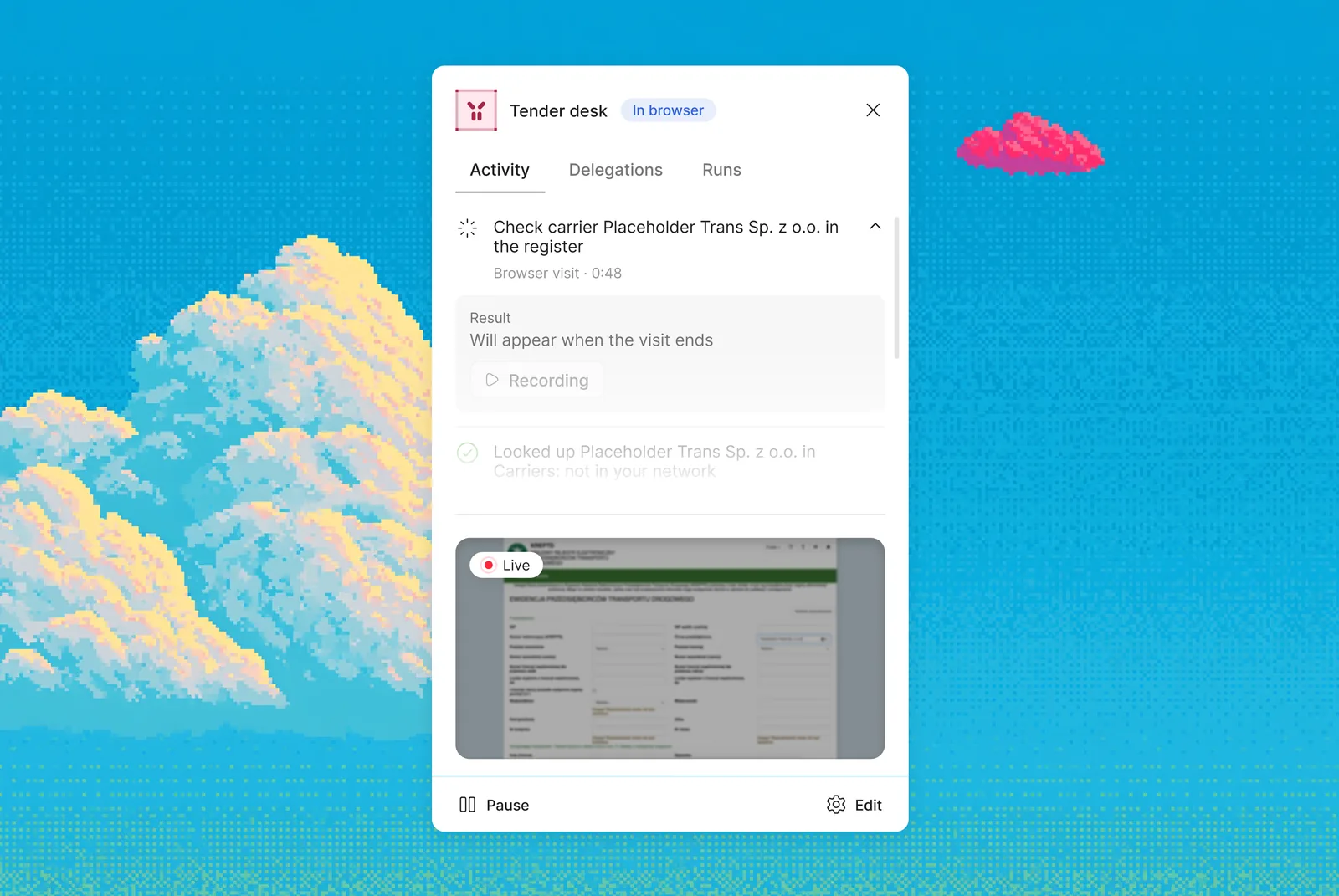
A Digital Worker can open a website and do a task there: check a carrier in a public register, look up a status in a customer portal, pull data from a page. Until now, anything that lived only on a website had to be done by hand.
You turn it on by giving the worker a browser visit ability and writing in its instructions how to behave on the site. One visit lasts up to 10 minutes. The browser starts clean, with no saved logins: if a site asks to sign in, the worker reports that and skips the visit.
While the worker is on a site, Live Office shows it as "In browser" with the live screen in its card. Afterwards the tender's Reasoning panel and the activity feed show a row like "Browser visit, done, 1:23". Expand it to see what the worker was asked to do, what came out of it, and a recording of the session.
Architect answers in Viber and Telegram
Viber now has a shared Cargofy chat. In it you can talk to Architect, get platform notifications and reply to your customers, and the system works out who each message is for. The Cargofy bot in Telegram now answers as Architect, and a workflow can write to a person in Telegram and pick up their reply.

Routines: every scheduled workflow in one list
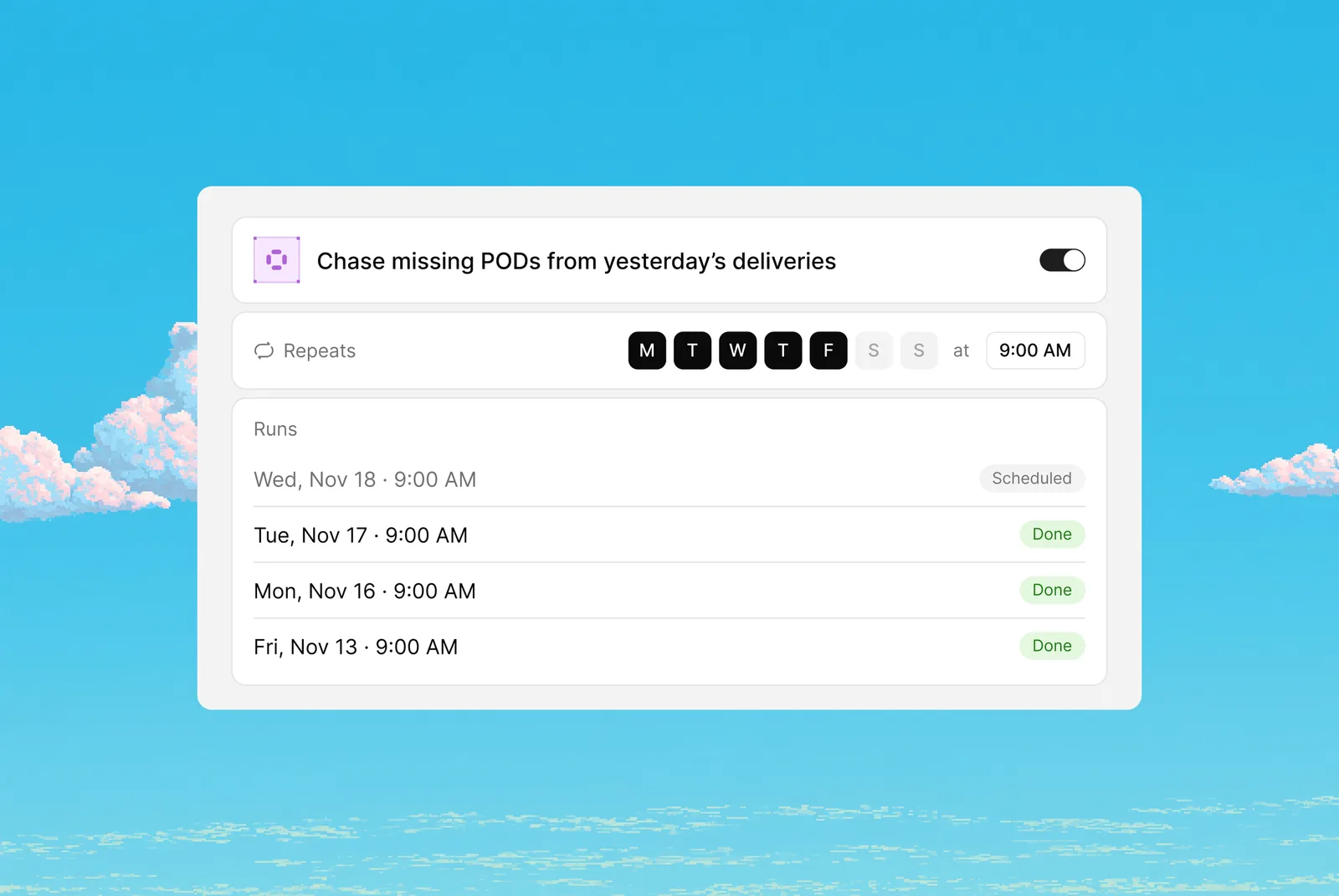
A new Routines item under Virtual Office lists every workflow that runs on a schedule. Each row shows the name and description, the schedule in plain words ("At 09:00, Monday to Friday"), the next run, the last run with its status, and an on/off switch. Click a row to see its runs. Before, these workflows were mixed in with the rest of Studio, and it was hard to tell what ran regularly and whether it worked.
Architect now understands routines too. Say "call the carriers every morning" or "send me a summary once a week", and it builds a scheduled workflow. If you don't name the time or frequency, it asks instead of guessing. Every new workflow also gets a one-paragraph description from Architect: when it starts, what it does, how it ends.
Workflows keep going when one step fails
A new Continue on error switch in step settings lets a workflow move on when a single step fails. Example: during a carrier calling run, one rejected bid used to stop the whole run. Now the workflow goes on to the next carrier.
Digital Workers can write and run code
When a task needs a calculation or a data transformation that no ready-made step covers, a Digital Worker or a workflow can now write the code for it and run it on its own. The code runs in an isolated environment, separate from the rest of your account.
Carrier calls
Follow the call live inside the tender
While the Digital Worker is on a call with a carrier, the tender's Reasoning panel now shows the conversation as it happens: a green dot, a timer, and each line from the worker and the carrier as it is said. Reload the page mid-call and nothing is lost.
When the call ends, the block folds into one line, such as "Answered, 0:44", with a short summary. Expand it for the full transcript with timestamps and a link to the call details with audio. In Communications, each call links to its tender and always shows the summary and the transcript.

No more mixed-up currencies on calls
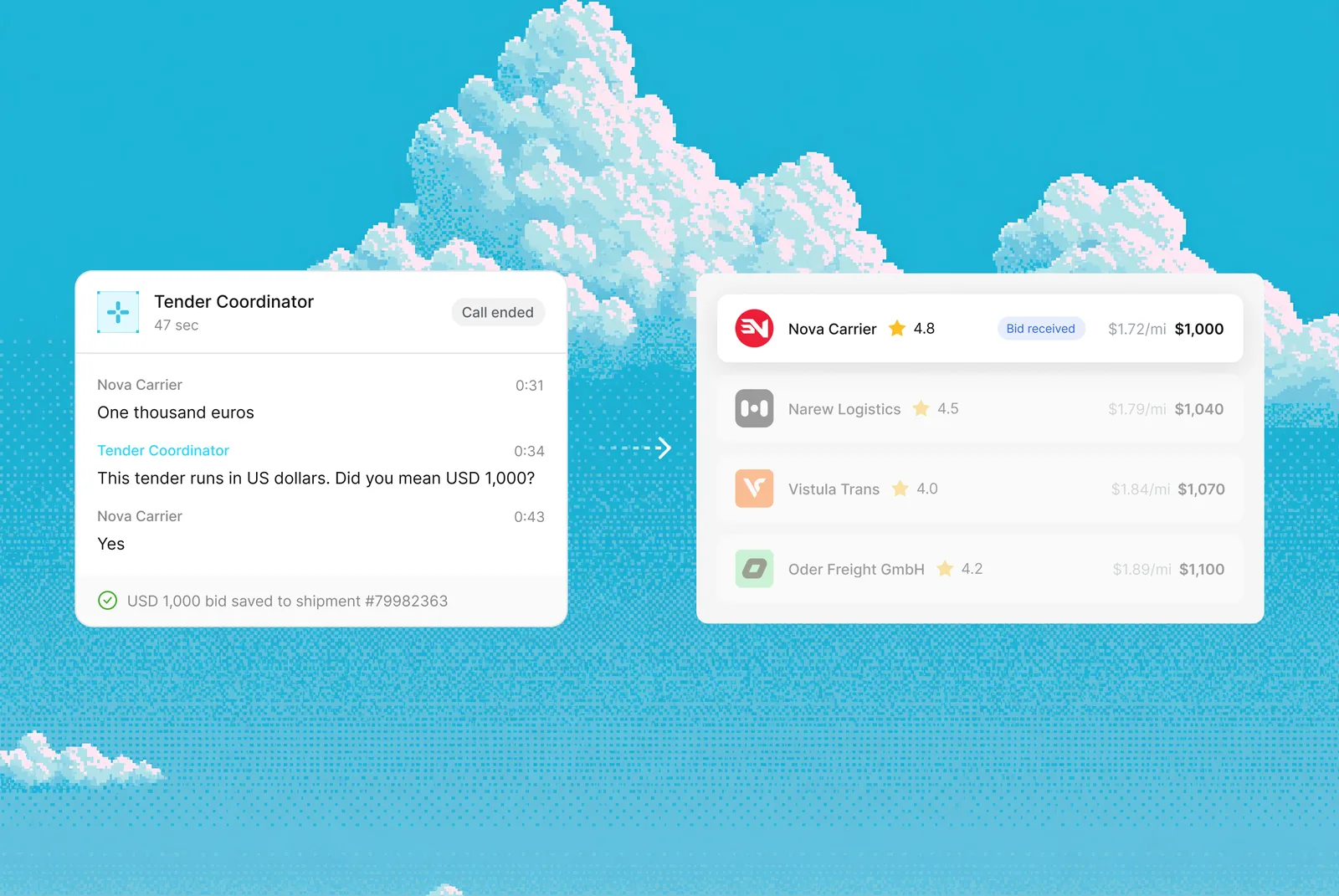
If a carrier names a price in a different currency than the tender, for example euros on a tender in US dollars, the worker no longer records the number as is. It says the tender runs only in US dollars and asks whether the carrier meant that amount in dollars. If the carrier insists on their currency, no bid is placed and the worker asks for the amount again.
Before saying goodbye, the worker now confirms the accepted bid and says amounts in words, in the tender's currency.
Calls sound more natural
The worker understands everyday names for truck body types in three languages, says "from A to B" in English, and catches short answers and amounts better in Ukrainian.
Tenders
Close a tender as soon as you pick the winner
A tender can now close right after you choose the winner, without waiting for the timeline to run out. You turn this on in the tender workflow.
A starting price hint from lane history
A tender draft now suggests a starting price based on the history of that route. You can upload your trip history from before Cargofy, so the hint works from day one.

Place a bid for any verified carrier in your network
You can now enter a bid on behalf of any verified carrier from your network, even if they weren't invited and have no email. Useful when a carrier calls your dispatcher with a price.
You choose which notifications carriers get
Shippers can now turn each type of carrier notification on or off: invitation, win, outbid and others.
Messaging and phone numbers
Send Viber messages from your own sender
You can now connect your own Viber sender, through your own LINK Mobility account, next to the shared Cargofy sender. Keys are checked before saving, and workflows and Digital Workers use the same actions and events with either sender.
Tender invitations sent by Viber or SMS from a workflow now carry a secure link to the tender, so the "Place a bid" button works. A carrier who follows that link without being logged in gets back to the tender after entering the code. Before, they landed on the dashboard.
Phone numbers for Digital Workers: fewer steps, fewer dead ends
You can order a number right after uploading your documents, without waiting for the check. If the account that pays for numbers runs low, money moves over from your main balance automatically, and you get an email if that is empty too. You can deactivate and reactivate a number yourself and buy a new one straight away. US numbers are available again, with the area code shown in the list.
Dashboard, locations and onboarding
See what each manager did on the dashboard
Manager activity moved from reports to the shipper dashboard, next to Top carriers and Locations. One row per team member: role, tenders created, bids viewed, assignments, logins and last activity for the dashboard period. Click a number to see the events behind it. Only people allowed to see reports see this block. It refreshes every 5 minutes.
All three tables are now regular dashboard blocks: switch them on or off and reorder them from the gear icon. Sorting in Top carriers now orders the whole list across pages.

Warehouses are now Locations, with bulk import
"Warehouse" is now called "Location". You can upload locations as a list from Excel or CSV, or ask a Digital Worker to do it.
Onboarding for companies in several markets
At the Basics step, a company can now pick several regions. Tender platforms, e-signature and load boards are collected from all chosen markets, without duplicates. MC and USDOT numbers are asked only if the US or Canada is among the regions.
Minor updates
Calls and workflows
- Calls built into workflows start with a 2-second pause so the greeting isn't cut off, read numbers and dates digit by digit, say one short phrase after 7 seconds of silence, use noise reduction and no longer cut off the goodbye.
- A message template with an unfilled placeholder like {{name}} shows a warning and can't be published.
- A call that never connects closes as "No answer" instead of hanging as "In progress".
- A workflow test run no longer takes real actions in your integrations: test emails aren't sent, the step shows what it would have done.
- Architect checks the fields a workflow step reads from and rejects a change that points to a field that doesn't exist.
- Custom integrations work with systems that issue a temporary key after a login and password, and a workflow can create a tender draft from external data.
- The Studio home page and Products are in the new design. The workflow list shows every workflow, with search and a filter.
Tenders and carriers
- Bids, the starting price, instant booking and extra services show in the tender's currency. US tenders show distance in miles and the price per mile.
- After a tender is rolled back, a step can't be closed twice from an old browser tab, and "Check documents" stays open until at least one document is approved.
- The Carriers section and the documents list and card are in the new design. Field errors when saving a truck show next to the field.
- A carrier invitation opens that shipper's own questionnaire, and the carrier can finish it later.
Phone numbers
- A company can keep several sets of identity documents, one per country of its numbers.
- A rejected document shows the reason in plain words before you order, and the purchase wizard survives a page reload.
- If an order fails, the card says plainly that nothing was charged and you can order again.
Lists, menus and fields
- Large cargo volume or weight now saves; before, a normal size in centimetres could exceed the field limit.
- Select-all is back in the shipments list and call table, so bulk publish and export work on whole pages.
- List filters have a "does not contain" option.
- The calls list on a trip card opens the transcript and recording in place.
- Knowledge bases moved to the main menu, System block. Old links still work.
- Phone fields accept a zero, and the shipper dashboard counts completed tenders correctly.